In an earlier article, we saw how you can use the Thunder Kubernetes Connector (TKC) to dynamically configure the Thunder ADC for load-balancing traffic to a Kubernetes cluster. In that article, the Thunder device load-balanced traffic to the worker nodes.
Starting from TKC v1.11, the TKC can dynamically configure Thunder ADC to send traffic to the back-end Pods using IPIP tunnels. For this, you also need to have a Kubernetes cluster with a CNI plugin that supports such tunnels (e.g. Calico CNI network plugin).
Setup
The K8s cluster consists of:
Master: 172.16.1.12
- Node: 172.16.1.13
- Node: 172.16.1.14
The Pod network is 192.168.0.0/16.

The K8s version is:
$ kubectl version --short
Client Version: v1.21.2
Server Version: v1.21.2
In this setup, we already have the Calico CNI network plugin and calicoctl CLI tool installed :
$ calicoctl version
Client Version:  v3.19.1
Git commit:    6fc0db96
Cluster Version:  v3.19.1
Cluster Type:   k8s,bgp,kubeadm,kdd
Enable HTTPS management access on the Thunder ADC interface
The Thunder Kubernetes Connector (TKC) will run as a Pod within the K8s cluster and will communicate with Thunder ADC on interface ethernet 1. For this, enable management access on that interface of the Thunder ADC:
enable-management service https
 ethernet 1
The current configuration of the Thunder device is:
!64-bit Advanced Core OS (ACOS) version 5.2.1-p5, build 114 (Jul-14-2022,05:11)
!
harmony-controller telemetry
  log-rate 1750
!
ip dns primary 8.8.8.8
!
ip dns secondary 9.9.9.9
!
timezone America/Los_Angeles
!
ntp server time.google.com
!
glm use-mgmt-port
glm enable-requests
!
interface management
  ip address 10.64.4.32 255.255.255.0
  ip control-apps-use-mgmt-port
  ip default-gateway 10.64.4.1
!
interface ethernet 1
  enable
  ip address 172.16.1.10 255.255.255.0
!
interface ethernet 2
!
!
enable-management service https
  ethernet 1
!
ip route 0.0.0.0 /0 172.16.1.1
!
sflow setting local-collection
!
sflow collector ip 127.0.0.1 6343
!
!
end
!Current config commit point for partition 0 is 0 & config mode is classical-mode
vThunder#
Install A10 CRDs
Install A10’s CRDs (Custom Resource Definition) in the Kubernetes cluster:
$ kubectl create -f https://a10networks.github.io/tkc-doc/crd/a10-crd-installation.yaml

$ kubectl api-resources | grep a10
clientssls            a10clissl     tkc.a10networks.com/v1alpha1      true     ClientSsl
healthmonitors          a10hm       tkc.a10networks.com/v1         true     HealthMonitor
natpools             a10natpool     tkc.a10networks.com/v1         true     NatPool
serverssls            a10srvssl     tkc.a10networks.com/v1alpha1      true     ServerSsl
servicegroups           a10sg       tkc.a10networks.com/v1         true     ServiceGroup
templateciphers          a10tc       tkc.a10networks.com/v1alpha1      true     TemplateCipher
virtualports           a10vport      tkc.a10networks.com/v1         true     VirtualPort
virtualservers          a10vip       tkc.a10networks.com/v1alpha1      true     VirtualServer
Add routes for the Thunder device LIF addresses
Determine the tunnel interface addresses on K8s master and worker nodes.
On K8s master:
$ ifconfig tunl0
tunl0: flags=193<UP,RUNNING,NOARP> mtu 1480
    inet 192.168.219.64 netmask 255.255.255.255
    tunnel  txqueuelen 1000 (IPIP Tunnel)
    RX packets 20 bytes 1468 (1.4 KiB)
    RX errors 0 dropped 0 overruns 0 frame 0
    TX packets 44 bytes 8168 (7.9 KiB)
    TX errors 0 dropped 0 overruns 0 carrier 0 collisions 0
On K8s worker node node01:
$ ifconfig tunl0
tunl0: flags=193<UP,RUNNING,NOARP> mtu 1480
    inet 192.168.196.128 netmask 255.255.255.255
    tunnel  txqueuelen 1000 (IPIP Tunnel)
    RX packets 44 bytes 8168 (7.9 KiB)
    RX errors 0 dropped 0 overruns 0 frame 0
    TX packets 20 bytes 1468 (1.4 KiB)
    TX errors 0 dropped 0 overruns 0 carrier 0 collisions 0
On K8 worker node node02:
$ ifconfig tunl0
tunl0: flags=193<UP,RUNNING,NOARP> mtu 1480
    inet 192.168.140.64 netmask 255.255.255.255
    tunnel  txqueuelen 1000 (IPIP Tunnel)
    RX packets 0 bytes 0 (0.0 B)
    RX errors 0 dropped 0 overruns 0 frame 0
    TX packets 0 bytes 0 (0.0 B)
    TX errors 0 dropped 0 overruns 0 carrier 0 collisions 0
The TKC will configure the last usable address of the /26 Pod subnet on each master and worker node as the LIF address on the Thunder device:
- Pod subnet = 192.168.219.64/26: last usable IP = 192.168.219.126
- Pod subnet = 192.168.196.128/26: last usable IP = 192.168.196.190
- Pod subnet = 192.168.140.64/26: last usable IP = 192.168.140.126
On the K8s Master add routes for these Thunder LIF addresses via the tunl0 interface:
$ sudo ip route add 192.168.219.126/32 dev tunl0 via 172.16.1.10 onlink

$ sudo ip route add 192.168.196.190/32 dev tunl0 via 172.16.1.10 onlink

$ sudo ip route add 192.168.140.126/32 dev tunl0 via 172.16.1.10 onlink


$ route -n
Kernel IP routing table
Destination     Gateway         Genmask         Flags Metric Ref    Use Iface
0.0.0.0         172.16.1.1      0.0.0.0         UG    100    0        0 eth0
172.16.1.0      0.0.0.0         255.255.255.0   U     100    0        0 eth0
172.17.0.0      0.0.0.0         255.255.0.0     U     0      0        0 docker0
192.168.122.0   0.0.0.0         255.255.255.0   U     0      0        0 virbr0
192.168.140.64  172.16.1.14     255.255.255.192 UG    0      0        0 tunl0
192.168.140.126 172.16.1.10     255.255.255.255 UGH   0      0        0 tunl0
192.168.196.128 172.16.1.13     255.255.255.192 UG    0      0        0 tunl0
192.168.196.190 172.16.1.10     255.255.255.255 UGH   0      0        0 tunl0
192.168.219.64  0.0.0.0         255.255.255.192 U     0      0        0 *
192.168.219.74  0.0.0.0         255.255.255.255 UH    0      0        0 cali8be648026d3
192.168.219.75  0.0.0.0         255.255.255.255 UH    0      0        0 calic5e10800701
192.168.219.76  0.0.0.0         255.255.255.255 UH    0      0        0 cali1cd14967bcc
192.168.219.126 172.16.1.10     255.255.255.255 UGH   0      0        0 tunl0
Configure Calico
Get the current config of the Felix component of Calico using:
$ calicoctl get felixConfig -o yaml > felixConfig.yaml
Currently, the config looks as follows:
$ cat felixConfig.yaml
apiVersion: projectcalico.org/v3
items:
- apiVersion: projectcalico.org/v3
  kind: FelixConfiguration
  metadata:
    creationTimestamp: "2021-07-14T23:17:14Z"
    name: default
    resourceVersion: "778"
    uid: 57e45741-dbf2-45e4-ad2c-27c3e5d4d268
  spec:
    bpfLogLevel: ""
    ipipEnabled: true
    logSeverityScreen: Info
    reportingInterval: 0s
kind: FelixConfigurationList
metadata:
  resourceVersion: "48327230"
In this, the “ipipEnabled” flag is currently set to true. Modify this “ipipEnabled” flag to false:
$ cat felixConfig.yaml
apiVersion: projectcalico.org/v3
items:
- apiVersion: projectcalico.org/v3
  kind: FelixConfiguration
  metadata:
    creationTimestamp: "2021-07-14T23:17:14Z"
    name: default
    resourceVersion: "778"
    uid: 57e45741-dbf2-45e4-ad2c-27c3e5d4d268
  spec:
    bpfLogLevel: ""
    ipipEnabled: false
    logSeverityScreen: Info
    reportingInterval: 0s
kind: FelixConfigurationList
metadata:
  resourceVersion: "48327230"
Now apply this modified setting:
$ calicoctl apply -f felixConfig.yaml
Successfully applied 1 'FelixConfiguration' resource(s)
Deploy a web app
In the K8s cluster, deploy a web service named web01, with the Service type of ClusterIP:
apiVersion: v1
kind: ConfigMap
metadata:
  name: webmap01
data:
  index.html: "<html><h1>This is web service web01</h1><html>"
---
apiVersion: v1
kind: Service
metadata:
  name: web01
spec:
  type: ClusterIP
  ports:
    - name: http-port
      protocol: TCP
      port: 8080
      targetPort: 80
  selector:
    app: web01
---
apiVersion: apps/v1
kind: Deployment
metadata:
  name: web01
spec:
  replicas: 2
  selector:
    matchLabels:
      app: web01
  template:
    metadata:
      labels:
        app: web01
    spec:
      volumes:
        - name: volmap
          configMap:
            name: webmap01
      containers:
        - name: nginx
          image: nginx:1.13
          ports:
            - containerPort: 80
          volumeMounts:
            - name: volmap
              mountPath: /usr/share/nginx/html/
Apply the config:
$ kubectl apply -f web01-clusterip.yaml
configmap/webmap01 created
service/web01 created
deployment.apps/web01 created
Check pods:
$ kubectl get pods -o wide
NAME                     READY   STATUS    RESTARTS   AGE   IP                NODE     NOMINATED NODE   READINESS GATES
web01-68c59f6f4c-nd247   1/1     Running   0          11s   192.168.140.112   node02   <none>           <none>
web01-68c59f6f4c-qdbtz   1/1     Running   0          11s   192.168.140.114   node02   <none>           <none>
Check services:
$ kubectl get svc
NAME         TYPE        CLUSTER-IP       EXTERNAL-IP   PORT(S)    AGE
kubernetes   ClusterIP   10.96.0.1        <none>        443/TCP    460d
web01        ClusterIP   10.109.161.206   <none>        8080/TCP   16m
Configure TKC
Create K8s Secret for Thunder device username/password
Create a Secret object with base64 encoding of the default username/password for the Thunder ADC (admin/a10):
apiVersion: v1
kind: Secret
metadata:
 name: a10-secret
type: Opaque
data:
 username: YWRtaW4=
 password: YTEw
Apply it:
$ kubectl apply -f a10-secret.yaml
secret/a10-secret created
Configure RBAC
Deploy ServiceAccount, ClusterRole, and ClusterRoleBinding objects. This ServiceAccount will subsequently be applied to the TKC, thereby granting the TKC the required permissions to access the various resources within the K8s cluster.
apiVersion: v1
kind: ServiceAccount
metadata:
  name: a10-ingress
  namespace: default
---
apiVersion: rbac.authorization.k8s.io/v1
kind: ClusterRole
metadata:
  name: a10-ingress
rules:
  - apiGroups: [""]
    resources: ["pods", "nodes", "services", "endpoints", "secrets", "configmaps"]
    verbs: ["get", "list", "watch"]
  - apiGroups: ["extensions", "networking.k8s.io"]
    resources: ["ingresses"]
    verbs: ["get", "list", "watch"]
  - apiGroups: ["tkc.a10networks.com"]
    resources: ["natpools", "healthmonitors", "virtualservers", "servicegroups", "serverssls", "virtualports", "templateciphers", "clientssls", "serversssls/status", "clientssls/status"]
    verbs: ["get", "watch", "list", "patch", "create", "update"]
---
apiVersion: rbac.authorization.k8s.io/v1
kind: ClusterRoleBinding
metadata:
  name: a10-ingress
roleRef:
  apiGroup: rbac.authorization.k8s.io
  kind: ClusterRole
  name: a10-ingress
subjects:
  - kind: ServiceAccount
    name: a10-ingress
    namespace: default
Deploy TKC
Here we deploy TKC version v1.11.1.2.
apiVersion: apps/v1
kind: Deployment
metadata:
  name: a10-thunder-kubernetes-connector
spec:
  replicas: 1
  selector:
    matchLabels:
      app: thunder-kubernetes-connector
  template:
    metadata:
      labels:
        app: thunder-kubernetes-connector
    spec:
      serviceAccountName: a10-ingress
      containers:
      - name: thunder-kubernetes-connector
        image: a10networks/a10-kubernetes-connector:1.11.1.2
        imagePullPolicy: IfNotPresent
        env:
        - name: POD_NAMESPACE
          valueFrom:
            fieldRef:
              fieldPath: metadata.namespace
        - name: WATCH_NAMESPACE
          value: default
        - name: CONTROLLER_URL
          value: https://172.16.1.10
        - name: ACOS_USERNAME_PASSWORD_SECRETNAME
          value: a10-secret
        - name: PARTITION
          value: shared
        - name: CONFIG_OVERLAY
          value: "true"
        - name: OVERLAY_ENDPOINT_IP
          value: 172.16.1.10
        - name: VTEP_ENCAPSULATION
          value: ip-encap
        args:
        - --watch-namespace=$(WATCH_NAMESPACE)
        - --use-node-external-ip=true
        - --patch-to-update=true
        - --safe-acos-delete=true
        - --use-ingress-class-only=true
        - --ingress-class=a10-ext
Apply it:
$ kubectl apply -f a10-tkc.yaml
deployment.apps/a10-thunder-kubernetes-connector created

$ kubectl get pods -o wide
NAME                                                READY   STATUS    RESTARTS   AGE   IP                NODE     NOMINATED NODE   READINESS GATES
a10-thunder-kubernetes-connector-7ccd6ff787-bcp4t   1/1     Running   0          14m   192.168.140.111   node02   <none>           <none>
web01-68c59f6f4c-nd247                              1/1     Running   0          17m   192.168.140.112   node02   <none>           <none>
web01-68c59f6f4c-qdbtz                              1/1     Running   0          17m   192.168.140.114   node02   <none>           <none>
In the above configuration, the following lines define the IPIP tunnel configuration:
        - name: CONFIG_OVERLAY
          value: "true"
        - name: OVERLAY_ENDPOINT_IP
          value: 172.16.1.10
        - name: VTEP_ENCAPSULATION
          value: ip-encap
Here the OVERLAY_ENDPOINT_IP is the physical IP of the Thunder device, in this case, 172.16.1.10
Deploy Ingress Resource
Deploy an Ingress Resource with an ingress class of a10-ext (this should match the ingress-class value in the TKC manifest file) :a10-ext
apiVersion: networking.k8s.io/v1
kind: Ingress
metadata:
  name: a10-ingress01
  namespace: default
  annotations:
    kubernetes.io/ingress.class: a10-ext
spec:
  rules:
  - host: web01.a10tests.com
    http:
      paths:
      - path: /
        pathType: Prefix
        backend:
          service:
            name: web01
            port:
              number: 8080
Apply it:
$ kubectl apply -f a10-ingress.yaml
ingress.networking.k8s.io/a10-ingress01 created

$ kubectl get ingress
NAME            CLASS    HOSTS                ADDRESS   PORTS   AGE
a10-ingress01   <none>   web01.a10tests.com             80      10s
Deploy A10 CRDs for SLB objects
HealthMonitor Resource
apiVersion: "tkc.a10networks.com/v1"
kind: HealthMonitor
metadata:
  name: hm-http
spec:
  name: hm-http
  type: http
  port: 80
  retry: 5
  interval: 10
  timeout: 2
  httpMethod: "GET"
  httpUrl: "/"
  httpCode: 200
Apply it:
$ kubectl apply -f crd-hm-http.yaml
healthmonitor.tkc.a10networks.com/hm-http created

$ kubectl get a10hm
NAME      NAME      STATUS   TYPE   HOST   URL   CODE
hm-http   hm-http   Active   http          /     200
ServiceGroup Resource
Note that the ServiceGroup Resource binds to a specific Service Resource, in this case, web01:
apiVersion: "tkc.a10networks.com/v1"
kind: ServiceGroup
metadata:
  name: sg-web01
spec:
  name: "sg-web01"
  service: "web01"
  healthCheckDisable: 1
  serverHealthCheck: "hm-http"
Apply it:
$ kubectl apply -f crd-sg-web01.yaml
servicegroup.tkc.a10networks.com/sg-web01 created

$ kubectl get a10sg
NAME       NAME       STATUS   SERVICE   PROTOCOL   METHOD
sg-web01   sg-web01   Active   web01     tcp        round-robin
VirtualServer Resource
apiVersion: "tkc.a10networks.com/v1alpha1"
kind: VirtualServer
metadata:
  name: vip-web01
spec:
  name: vip-web01
  ip-address: 172.16.1.251
Apply it:
$ kubectl apply -f crd-vip-web01.yaml
virtualserver.tkc.a10networks.com/vip-web01 created

$ kubectl get a10vip
NAME        NAME        VIP            IPAM   STATUS
vip-web01   vip-web01   172.16.1.251          Active
VirtualPort Resource
Note that the VirtualPort resource binds to a specific Ingress resource, in this case, a10-ingress01:
apiVersion: "tkc.a10networks.com/v1"
kind: VirtualPort
metadata:
  name: vport-web01-http
spec:
  virtualServer: "vip-web01"
  port: 80
  protocol: "http"
  ingress: "a10-ingress01"
  snatAuto: 1
Apply it:
$ kubectl apply -f crd-vport-web01-http.yaml
virtualport.tkc.a10networks.com/vport-web01-http created

$ kubectl get a10vport
NAME               PORT   PROTOCOL   STATUS   VIRTUALSERVER   INGRESS
vport-web01-http   80     http       Active   vip-web01       a10-ingress01
Verification
On the Thunder ADC, you will see the following configuration has been added by the TKC:
interface lif acosk8s-140_64
  ip address 192.168.140.126 255.255.255.192
!
interface lif acosk8s-196_128
  ip address 192.168.196.190 255.255.255.192
!
interface lif acosk8s-219_64
  ip address 192.168.219.126 255.255.255.192
!
!
health monitor hm-http
  retry 5
  interval 10 timeout 2
  method http port 80 expect response-code 200 url GET /
!
slb server 192.168.140.112 192.168.140.112
  health-check hm-http
  port 80 tcp
!
slb server 192.168.140.114 192.168.140.114
  health-check hm-http
  port 80 tcp
!
slb service-group sg-web01 tcp
  health-check-disable
  member 192.168.140.112 80
  member 192.168.140.114 80
!
slb template http default-a10-ingress01-httpTemplate
  url-switching starts-with / service-group sg-web01
!
slb virtual-server vip-web01 172.16.1.251
  port 80 http
    source-nat auto
    service-group sg-web01
    template http default-a10-ingress01-httpTemplate
!
!
overlay-tunnel vtep 183
  encap ip-encap
  local-ip-address 172.16.1.10
  remote-ip-address 172.16.1.12
    lif acosk8s-219_64
  remote-ip-address 172.16.1.13
    lif acosk8s-196_128
  remote-ip-address 172.16.1.14
    lif acosk8s-140_64
!
As one can see, here the real servers are the Pod IP addresses.
On the client machine, we have a DNS entry for “web01.a10tests.com” mapped to the VIP on the Thunder ADC.
Now we can access the website http://web01.a10tests.com from this client machine:
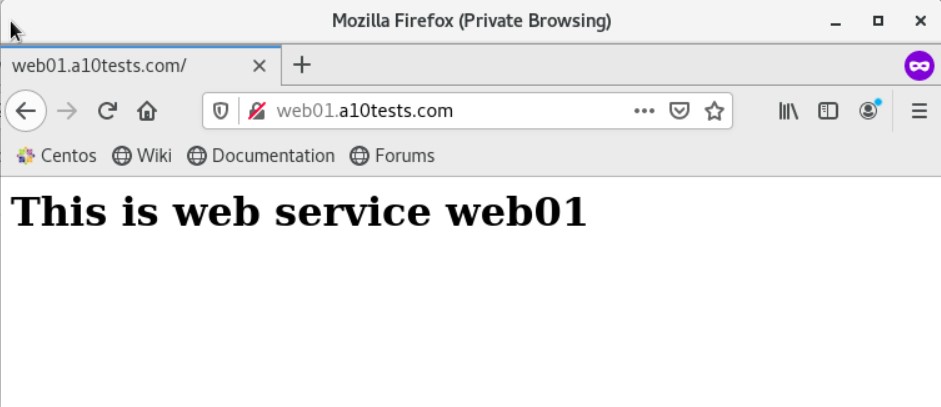
On the Thunder ADC, you can verify the SLB session entry:
vThunder#sh session

                     <snip>

Prot Forward Source      Forward Dest       Reverse Source      Reverse Dest       Age  Hash Flags       Type

---------------------------------------------------------------------------------------------------------------------------------------------------

Tcp  172.16.1.1:55268          172.16.1.251:80           192.168.140.112:80        192.168.140.126:24128     600   1    NSe1Cf0r0         SLB-L7


Total Sessions:  1
vThunder#